

Create an order
Enter an order by hand, find a returning customer by phone, pick products from your catalog, and save.
Use this when a customer orders by phone, in person, or in a chat you'd rather type up yourself. To build an order from chat messages instead, see Make an order from a chat.
Before you start
Creating orders needs a role that can manage orders, such as Owner, Manager or Staff.
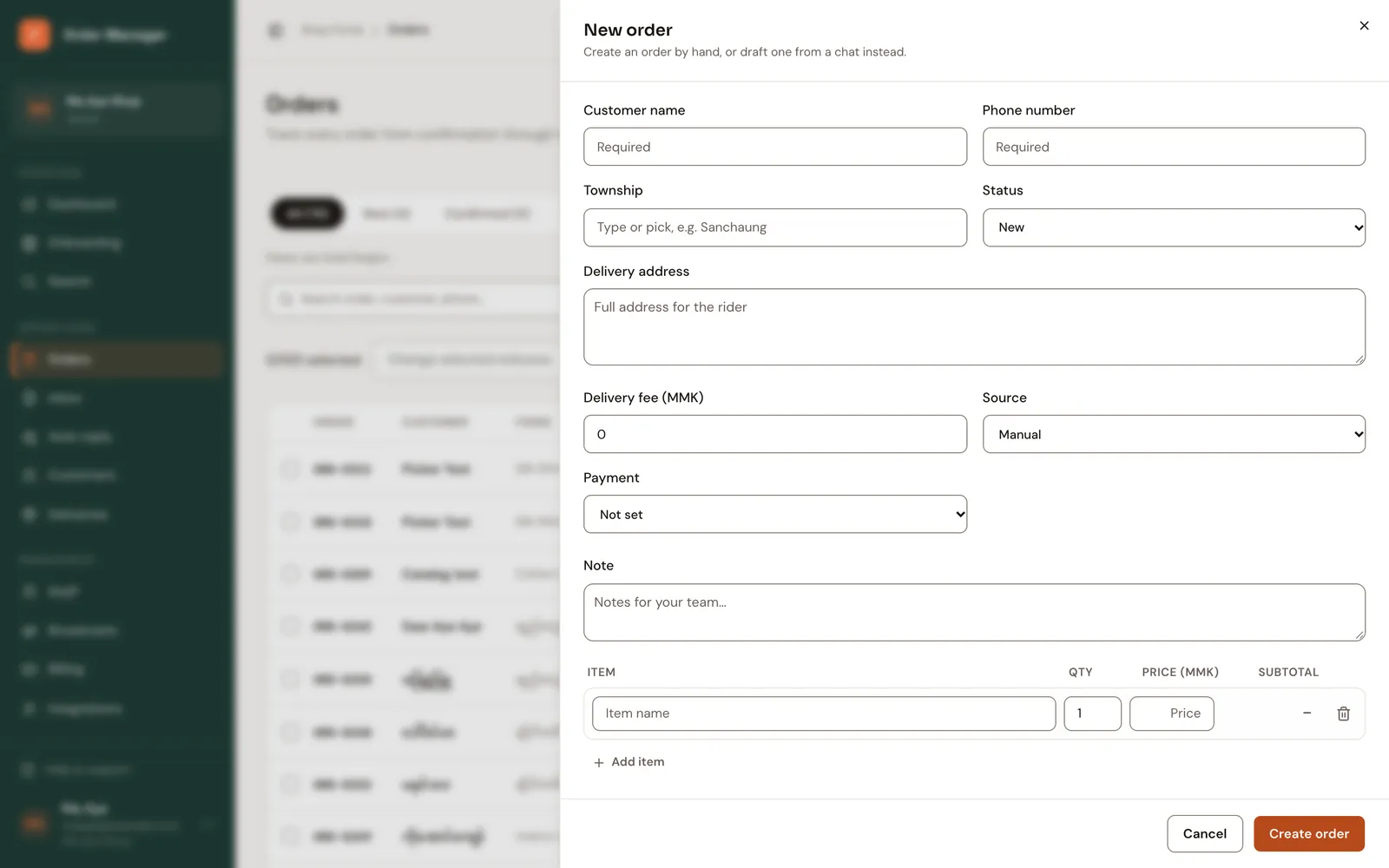
Click New order (on the dashboard or the orders list).
Type the Phone number first. If it belongs to a returning customer, FOM shows Returning customer with their order count; click Use name's details to fill in the rest.
Otherwise fill in Customer name, Township and Delivery address.
Under items, start typing in Item. Pick a product from the list to fill in its price and link its stock, or choose Use as typed to keep your own text. Set Qty and Price (MMK). Use Add item for more.
Enter the Delivery fee (MMK), choose Payment and add a Note if needed.
Click Create order.
Payment methods
Cash on delivery, Prepaid transfer, KBZPay, Wave Pay or Other. You can change it later on the order.
Same phone, different name
If the phone number belongs to a customer with a different name, FOM asks whether to Use existing customer or Create separate customer. Usually it's the same person, so use the existing one.
Checks: at least one item, quantity from 1 to 10,000, prices in whole kyat, and a delivery fee (it can be 0).