

The customer's tracking page
What customers see when they open their order's tracking link, how long the link works, and how to turn automatic messages on.
Each order has a page your customer can open from a link, with no account or app. It saves you answering "where is my order?".
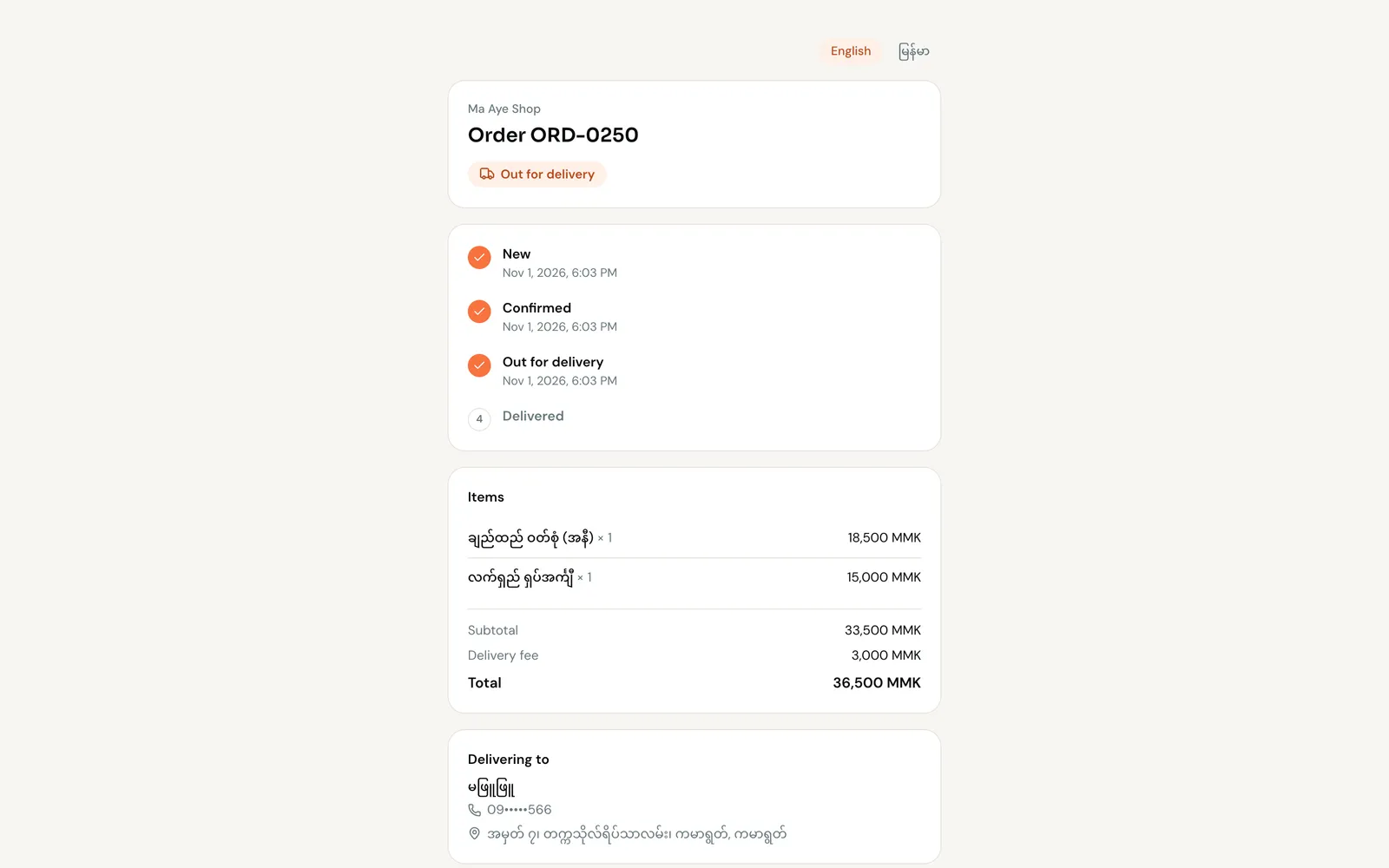
What the customer sees
- Your shop's name and the order number.
- Order progress: New, Confirmed, Out for delivery, Delivered, with times.
- The Items, Subtotal, Delivery fee and Total.
- Delivering to: their name, address and a masked phone, like
09•••••456. - The planned delivery time, if you set one.
- A language switch for Myanmar and English.
How long it works
The link keeps working while the order is open, and for 30 days after it's delivered or cancelled. After that the page says This link has expired.
To stop a link at any time, Reset link on the order (web). The old link stops working immediately; share the new one if needed.
Send it automatically
FOM can message the customer, in the same chat, when their order changes, and add the tracking link.
Before you start
Changing these settings needs the Owner role (Manage shops). The order must be linked to a customer's chat.
Go to Settings → Notifications → Messaging notifications. Turn on Send a status update when an order is confirmed and the out-for-delivery update (and others you want), then Save preferences.
To send the link yourself, see Invoices and tracking links.